The Binance Smart Chain (BSC) is one of the top-five blockchains by trading volume (CoinMarketCap). This popular blockchain hosts dozens of tokens, including its native BNB token, with daily trading volumes running into billions of dollars. But, as a crypto trader or routine user, how can you track these trading volumes and every other metric related to the BNB Chain? That's where BscScan comes in.
BscScan is a blockchain explorer designed for the BNB Chain, also known as the BSC chain. It's an intuitive platform that lets you track all transactions on this blockchain. BscScan helps traders, developers, and businesses make informed decisions related to the BSC blockchain, e.g., when to trade tokens.

Key features of BscScan include:
[[aa-cta]]
Payment API
REST API for Crypto Payment Processing
Accept, convert, and settle crypto payments through a single REST API. B2BINPAY supports custom callbacks, real-time transaction webhooks, and a full sandbox environment for rapid integration.
[[/a]]
Transaction tracking
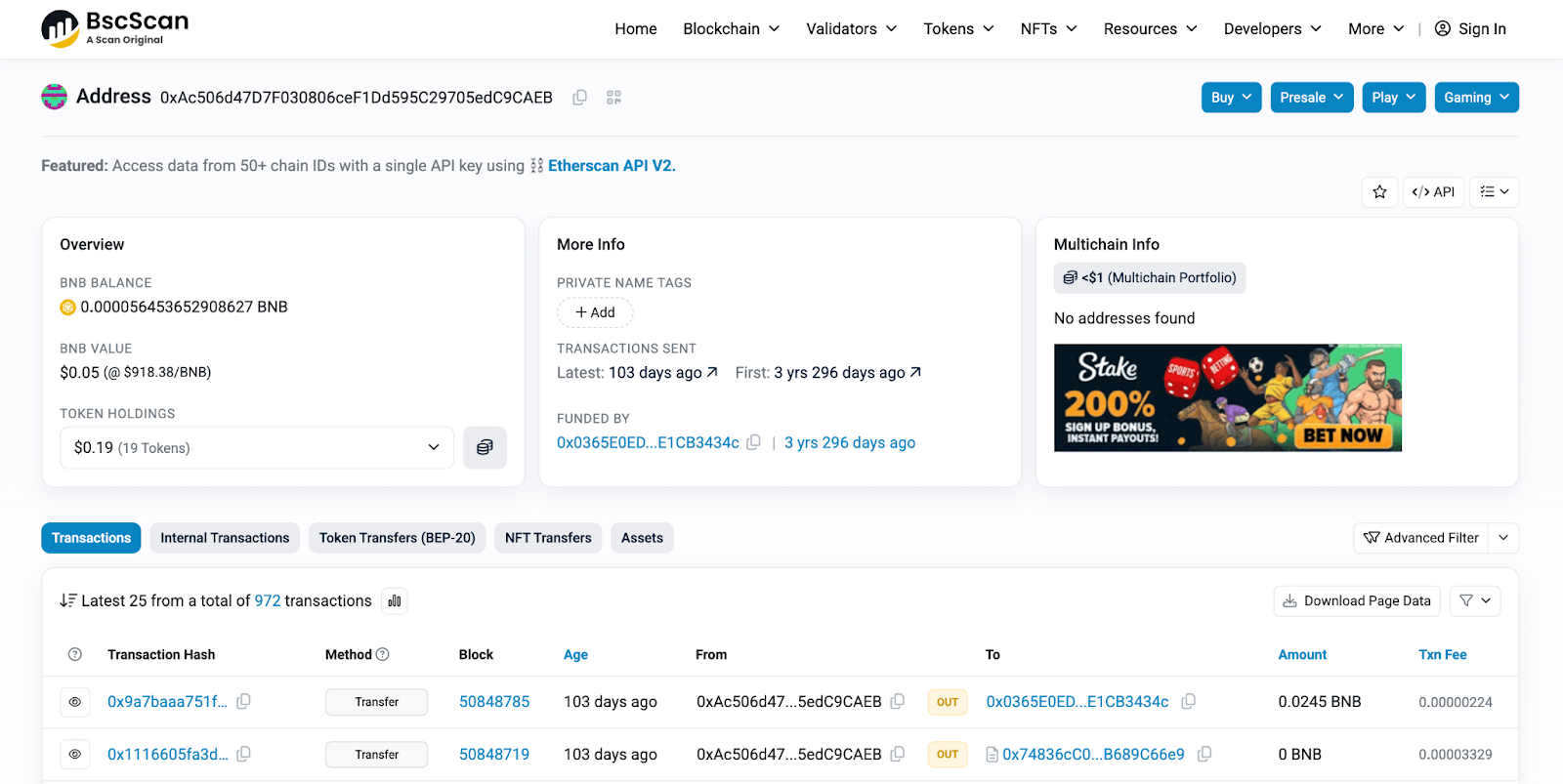
BscScan lets you check the status of any transaction executed on the Binance Smart Chain and track any BSC wallet. You can enter a specific wallet address and view its complete transaction history.

Smart contract interaction
With BscScan, you can verify and analyze smart contracts executed on the BSC blockchain. You just need the specific smart contract address, and you can view all details related to it.
Wallet insights
On BscScan, you can enter any BSC-hosted wallet's address and monitor its transaction history. For example, you can monitor wallet balances and token holdings of large wallets to guide your trading strategy.
Developer tools
BscScan provides API tools to integrate its platform with your website or app. For instance, if you operate a crypto trading app, you can integrate BscScan's BSC wallet tracker to let traders monitor transactions and make informed decisions.
Common ways to use BscScan
BscScan is a must-have tool for anyone interacting with the BNB Smart Chain. With this tool, you can easily find information about any wallet or smart contract hosted on the BNB Smart Chain. You can monitor in-depth transaction data and make informed decisions based on this data.
Searching for transactions
BscScan makes it simple to find information about any transaction executed on the BNB Smart Chain. All you need is the transaction hash, a unique code generated and assigned to each blockchain transaction. Alternatively, you can provide a wallet address and view all transactions conducted on that wallet. Follow the steps below:
- Copy the transaction hash or wallet address.
- Head to BscScan.com paste the copied text into the search bar at the top of the homepage.
- View detailed information about the wallet or transaction on your dashboard, including the amount, gas fees paid, timestamp, block number, and status (pending, completed, or failed).

How to find your wallet on BscScan?
BscScan charts & statistics

Market data

Blockchain data

Network data

Contracts data

Verifying smart contracts on BscScan

Security and privacy considerations when using BscScan
Blockchain technology platforms have higher security risks than most digital platforms. Malicious actors often target blockchain tools to steal funds or sensitive data, making security paramount when using these tools. When using BscScan, you should adhere to the following security measures:
Use trusted explorers
You should always stick to trusted blockchain explorers, such as BscScan, to monitor network activity. Avoid obscure explorers or those bearing suspiciously similar names to known explorers, as they might be malicious.
Check the URL
Always double-check the URL when visiting BscScan. The correct URL is "BscScan.com" and nothing else.
Hackers often create fake copies of blockchain platforms to steal data. These sites use similar but incorrect URLs, like 'BscScan.co' or 'BsscScan.com.' Always check the URL to ensure you're on the official 'BscScan.com' website
Beware of third-party links
Beware of any third-party links displayed on block explorer sites, including BscScan, particularly those promoting seemingly lucrative offers. Malicious links can lead to illegitimate websites designed to steal data or install malware on your PC. Avoid clicking on links you aren't familiar with.
Avoid sharing private information
Never share private information, such as your wallet password, seed phrase, or recovery phrase, with any blockchain platform. BscScan and any other legitimate blockchain explorer will never ask for such private details. If any block explorer asks for these sensitive details, it's an illegitimate platform designed by malicious actors to steal funds and data.
Use a VPN
You should turn on a virtual private network (VPN) app before interacting with BscScan. A VPN app encrypts your browsing activity by routing it through a secure, remote server. It adds an extra layer of security that prevents third parties from tracking what you do on BscScan.
[[aa-note]]
API-first payment infrastructure allows businesses to embed crypto acceptance directly into existing checkout flows, back-office systems, or custom trading platforms without redirecting users to third-party pages.
[[/a]]
BscScan tools for developers
BscScan API
The BscScan API lets developers connect their platform to data sourced from BscScan. With API integration, users on your platform can fetch data from BscScan without leaving the platform itself. Examples include:
Fetching transaction data
From your app, users can retrieve transaction details for a specific wallet address. They can also monitor general transaction data to make informed decisions.
Monitoring token prices
Users can access real-time pricing and market capitalization data for all tokens hosted on the BSC blockchain.
Building blockchain analysis tools
Developers can leverage BscScan's data to build decentralized apps that allow users to analyze key blockchain metrics, such as average gas fees, transaction speed, and trading volumes.
Testnet Explorer
The Testnet Explorer provides a virtual environment for developers to test their smart contracts without risking real tokens. It works exactly like the Binance Smart Chain, but with test tokens and no actual transactions taking place.
With the Testnet, you can easily check if your BSC smart contract is working as intended and observe any flaws to be fixed before deploying the contract for public use. BscScan provides this valuable tool to assist developers in building secure and reliable smart contracts.
FAQ
Is BscScan a wallet?
No, BscScan isn't a blockchain wallet. Rather, it's a block explorer that lets you monitor important data on the Binance Smart Chain (BSC), from trading volumes to leading validators, token holdings, gas fees, and more.
Is it possible to get a refund for a transaction on the BSC chain?
Blockchain transactions are irreversible once settled, as there's no central authority to intervene in cases of wrong transactions. The only way to get a refund is to have the recipient willingly send back the tokens, and there's little guarantee of this happening. Because of this irreversibility, you should always double-check details before finalizing a transaction on the BSC chain.
Notably, BscScan doesn't process transactions. Rather, it's a platform for monitoring transactions made on the BSC blockchain through third-party crypto exchanges, wallets, and peer-to-peer trading platforms.
Can BscScan track Bitcoin?
No, BscScan can't track Bitcoin (BTC) because it is built exclusively to monitor data on the Binance Smart Chain (BSC). Bitcoin is hosted on a different blockchain, so it can't be tracked via BscScan.
Do you need an account to use BscScan?
No, you do not need an account to use BscScan. However, an account is necessary to unlock some features, such as API access and custom token watchlists.
What can BscScan be used for?
You can use BscScan to track all transactions executed on the Binance Smart Chain, whether pending or completed. You can monitor key data such as daily trading volume and the number of transactions for specific tokens over time.
What information can I find by reading smart contracts on BscScan?
On BscScan, you can find important information about a smart contract, such as its deployment date and time, the number of wallet addresses interacting with the smart contract, and the total token supply.
How does BscScan enhance security in the BNB Smart Chain ecosystem?
BscScan enhances security by providing a platform for developers and individuals to verify smart contracts and transaction histories. Thanks to BscScan, crypto users can easily determine whether they're interacting with a legitimate smart contract and identify any suspicious transactions where they happen.
Is it free to use BscScan?
Yes, you can access most BscScan features for free. However, developers need a paid plan to unlock full access to BscScan's APIs.
How do I check wallet balances and history on BscScan?
Visit BscScan.com, enter the wallet address in the search bar, and press the search button. You'll then see all the wallet's transactions and its current balance. Notably, this feature only works for wallets hosted on the Binance Smart Chain.
How do I interact with a smart contract using BscScan?
[[aa-cta-grey]]
Compliance Suite
FATF Travel Rule via Notabene
B2BINPAY's integration with Notabene automates originator and beneficiary data exchange across VASPs, keeping you compliant with Travel Rule requirements in all applicable jurisdictions.
[[/a]]
Head to BscScan.com, enter the smart contract address in the search box, and click the search button. Immediately, you'll see the transaction history and other key data about the smart contract.

.svg)